Licencing
Plug-in and template licensing (Shop 5.0.0 and later versions)
Prerequisites:
First things first, you have to create your new template/plug-in in the JTL-Customer Centre and generate a
new EsxID for this template/plug-in.
To do this, log in to your customer centre in the area Manage extensions and create a new extension of your choice, either the JTL-Shop 5 plug-in or template. (Please note that you need to have gone through seller onboarding to be able to offer your plug-ins and templates in the JTL Extension Store).
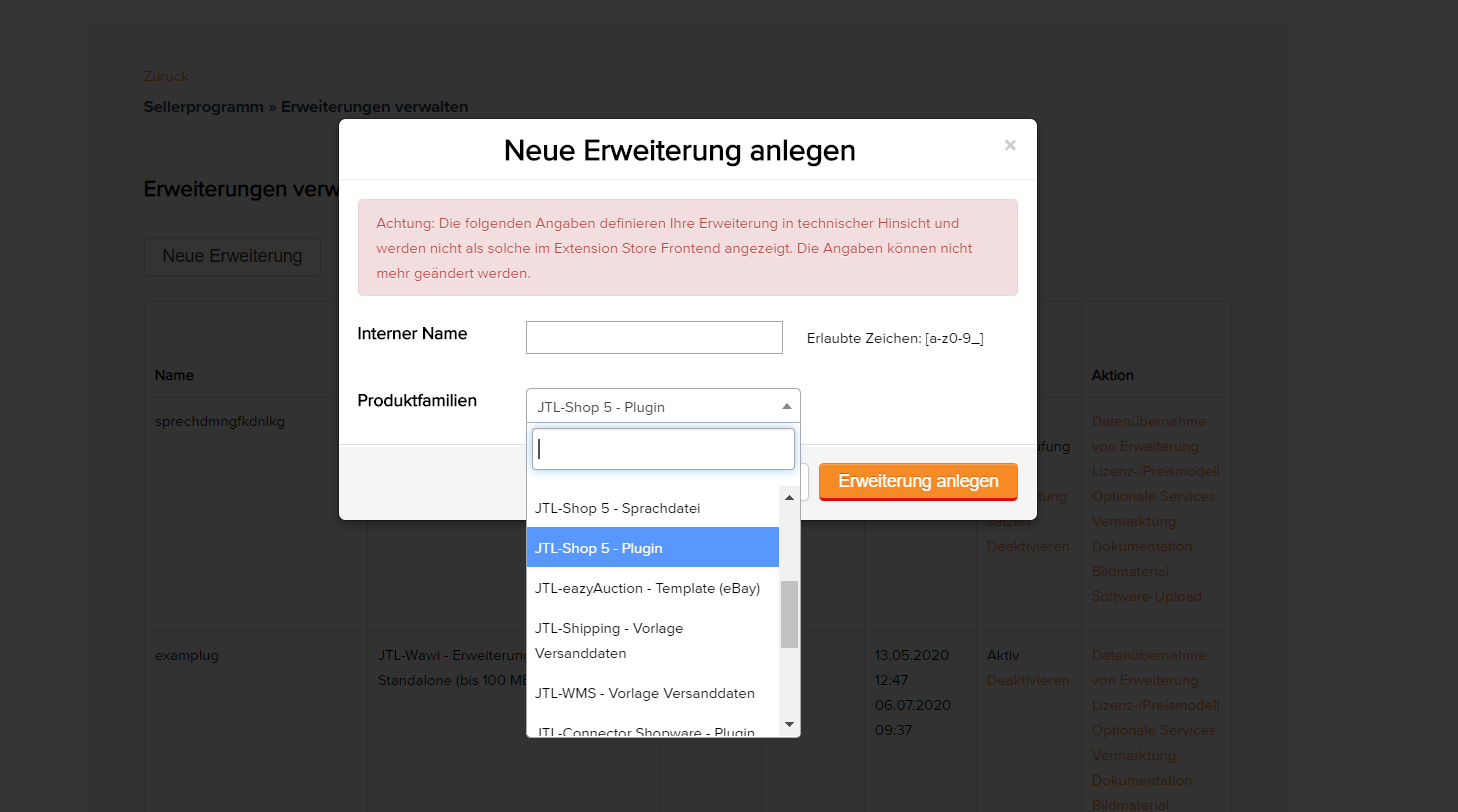
Upon creating the new extension, a corresponding ExsID will also be automatically generated.
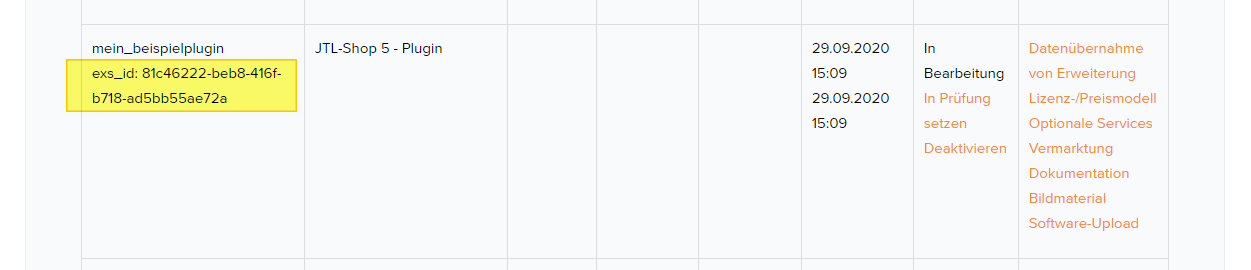
ExsID
Enter the ExsID in the info.xml of your plug-in or in the template.xml of your template.
Plug-in example:
 <?xml version="1.0" encoding="UTF-8"?>
 <jtlshopplugin>
     <Name>My Hypothetical Plug-in</Name>
     <Description>Does not do anything, because it is just an example</Description>
     <Author>John Smith</Author>
     <URL>https://www.example.com</URL>
     <XMLVersion>100</XMLVersion>
     <ShopVersion>5.0.0</ShopVersion>
     <PluginID>my_example</PluginID>
     <CreateDate>2020-05-18</CreateDate>
     <Version>1.2.3</Version>
     <ExsID>175a1eb9-1234-4f87-b0e3-63bf782d37ba</ExsID>
     <Install>
         <empty></empty>
     </Install>
 </jtlshopplugin>
Template example:
 <?xml version="1.0" encoding="utf-8" standalone="yes"?>
 <Template isFullResponsive="true">
     <Name>MyTemplate</Name>
     <Description>Example</Description>
     <Author>John Smith</Author>
     <URL>https://www.example.com</URL>
     <MinShopVersion>5.0.0</MinShopVersion>
     <Version>1.0.0</Version>
     <Framework>Bootstrap4</Framework>
     <Parent>NOVA</Parent>
     <ExsID>175a1eb9-1234-4f87-b0e3-63bf782d37ba</ExsID>
     <Boxes>
         <Container Position="left" Available="1"></Container>
         <Container Position="right" Available="0"></Container>
         <Container Position="top" Available="0"></Container>
         <Container Position="bottom" Available="1"></Container>
     </Boxes>
 </Template>
If you want to offer your plug-in or template free of charge, then you do not need to take any additional
steps.
The plug-in can now be updated and installed via the JTL-Shop back end.
If you have issued trial licenses, plug-ins with expired trial licences will be automatically deactivated.
Plug-in ID when updating
With proper use of the plug-in ID, you can be sure that your plug-in is correctly updated. Identical
naming of the PluginID and its installation folder across versions ensures that plug-ins can
update themselves.
If the names of the PluginID and its installation folder have disparities between 2 versions, JTL-Shop will not update the existing plug-in, but rather perform a separate reinstallation, so that in the end 2 different versions of the same plug-in are installed.
Therefore, ensure that across all versions of your plug-ins, the PluginID in the info.xml file, the plug-in’s installation
folder, as well as the field PluginID are named exactly the same when maintaining the extension in the Customer Centre , in
order to avoid any related errors.
Licence check
In the case that the licence or subscription must be checked manually, the shop provides some solutions for this.
Bootstrapping
The method BootstrapperInterface::licenseExpired(ExsLicense $license): void``can
be implemented in the ``Bootstrap.php plug-in or template. This method is called up when
JTL-Shop checks for expired extensions.
This is conducted every 4 hours by Cronjob and each time the licence overview is updated in the back end.
Getter for plug-ins
For the licence object of a plug-in instance, there is always a getter for the associated licence.
/** @var \JTL\Plugin\Plugin $plugin */
$subscription = $plugin->getLicense()->getExsLicense()->getLicense()->getSubscription();
Getter for templates
Even for template model instances, there is a getter.
/** @var \JTL\Template\Model $template */
$subscription = $template->getExsLicense()->getLicense()->getSubscription()
License manager
The license manager is used to get the licence for any extension (especially useful for “InApp Purchases”).
$manager      = new JTL\License\Manager(\JTL\Shop::Container()->getDB(), \JTL\Shop::Container()->getCache());
$subscription = $manager->getLicenseByExsID('some_exs_id');
Complex examples
The different possibilities in the Bootstrap.php of a (child) template are shown in the following code example.
<?php declare(strict_types=1);

namespace Template\mychildtemplate;

use JTL\License\Manager;
use JTL\License\Struct\ExsLicense;
use JTL\Shop;

class Bootstrap extends \Template\NOVA\Bootstrap
{
    public function boot(): void
    {
        parent::boot();
        $this->customLicenseCheck();
        $this->checkViaManager();
    }

    private function customLicenseCheck(): void
    {
        $license = $this->getTemplate()->getExsLicense();
        if ($license === null) {
            die('Oops! No licence.');
        }
        if ($license->getLicense()->getSubscription()->getDaysRemaining() < 14) {
            echo 'Warning! Subscription expires soon!';
        } elseif ($license->getLicense()->getDaysRemaining() < 14) {
            echo 'Warning! Licence expires soon!';
        } elseif ($license->getLicense()->isExpired()) {
            // FALLBACK to default template
            Shop::Container()->getTemplateService()->setActiveTemplate('NOVA');
            die('Please obtain a new licence!');
        } elseif ($license->getLicense()->getSubscription()->isExpired()) {
            die('Please obtain a new subscription!');
        }
    }

    private function checkViaManager(): void
    {
        $manager = new Manager($this->getDB(), $this->getCache());
        $license = $manager->getLicenseByItemID('some_item_id');
        if ($license !== null && $license->getLicense()->getSubscription()->isExpired()) {
            // do something
        }
        $otherLicense = $manager->getLicenseByExsID('exsidOfAnotherPlugin');
        if ($license !== null && $license->getLicense()->getSubscription()->isExpired()) {
            // do something else
        }
    }

    public function licenseExpired(ExsLicense $license): void
    {
        echo 'Aah! The licence is expired!';
        // FALLBACK to default template
        Shop::Container()->getTemplateService()->setActiveTemplate('NOVA');
    }
}
Similarly, the methods from the Bootstrap.php of a plug-in will work.
Here, you also have the option to forcefully disable plug-ins by calling up JTL\Plugin\Plugin::selfDescruct()
.
 <?php declare(strict_types=1);

 namespace Plugin\my_example;

 use JTL\Events\Dispatcher;
 use JTL\Plugin\Bootstrapper;
 use JTL\Plugin\State;

 class Bootstrap extends Bootstrapper
 {
     public function boot(Dispatcher $dispatcher)
     {
         parent::boot($dispatcher);
         $license = $this->getPlugin()->getLicense()->getExsLicense();
         if ($license === null || $license->getLicense()->getSubscription()->isExpired()) {
             $this->getPlugin()->selfDestruct(State::EXS_SUBSCRIPTION_EXPIRED, $this->getDB(), $this->getCache());
         }
     }
 }