Notifications
In the back end of the JTL-Shop 5, you have the option to display any information that is of significance to the shop administrator all
in one, central place.
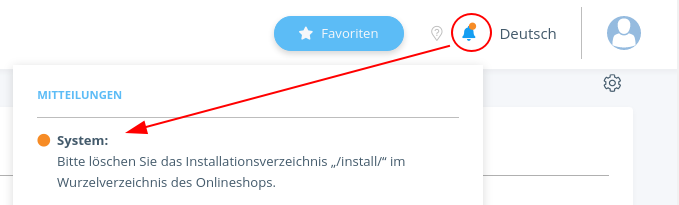
This mechanism is known as a “notification” and is only available in the back end of the online shop.
Notifications are mainly used to indicate any unfavourable or invalid configurations or errors of the online store. They can also be generated by plug-ins.
The singleton class notification, for example, keeps the add() method ready.
/**
 * @param int         $type
 * @param string      $title
 * @param string|null $description
 * @param string|null $url
 */
 public function add(int $type, string $title, string $description = null, string $url = null)
The simplest way to display a status message for your plug-in is by directly calling up add().
Example:
Notification::getInstance()
    ->add(
        NotificationEntry::TYPE_WARNING,
        $this->getPlugin()->getMeta()->getName(),
        'Plug-in not configured!',
        Shop::getAdminURL() . '/plugin.php?kPlugin=' . $this->getID()
    );
Parameter of the add() method
| Parameter | Application |
|---|---|
$type |
notification priority (See: NotificationEntry Types) |
$title |
title text |
$description |
description text |
$url |
optional link destination, should notification redirect to a back end page |
Another way to create notifications is by generating a NotificationEntry object.
/**
 * NotificationEntry constructor.
 * @param int         $type
 * @param string      $title
 * @param null|string $description
 * @param null|string $url
*/
public function __construct($type, $title, $description = null, $url = null)
The parameter used to create a NotificationEntry is similar to the add() method.
This way, all notifications can be defined in one, central place and be easily displayed later on when
relevant.
Example:
// definition
//
$entry = (new NotificationEntry(
    NotificationEntry:: TYPE_WARNING,
    $this->getPlugin()->getMeta()->getName(),
    'Plug-in not configured!',
    Shop::getAdminURL() . '/plugin.php?kPlugin=' . $this->getID()
))->setPluginId($this->getPluginID());

// publication (later)
//
Notification::getInstance()->addNotify($entry);
NotificationEntry Types
| Constant | Value | Possible application | |
|---|---|---|
TYPE_INFO |
0 |
(Colour: light grey) general information |
TYPE_WARNING |
1 |
(Colour: orange) warning for settings, that could impair proper operation of the online shop |
TYPE_DANGER |
2 |
(Colour: red) warning for critical settings and errors |
Rendering of all notifications occurs upon initialisation of the shop’s back end. Here, the event
dispatcher backend.notification will also be triggered. This event allows plug-ins to create their own notifications
.
Attention
The creation of a NotificationEntry should not contain any time-critical programme steps, as this could block the shop’s back end.